
Is My Car Locked? A Simple Problem with a Smart Fix
A relatable everyday problem with the Kia Sonet key fob sparked a simple yet powerful UX idea: a mechanical lock-status indicator that reduces doubt without draining battery. This article explores why key fobs don’t give feedback, the security risks that come with it, and how a tiny, battery-free design change can improve user confidence and convenience.

Introduction
Ever since we brought home the Kia Sonet, I’ve genuinely enjoyed every bit of the experience the drive, the design, and the thoughtful tech that makes daily commuting feel smoother. But very quickly, I stumbled upon a surprisingly universal moment of doubt: “Did I actually lock the car?” It’s a tiny hesitation, yet one that almost every car owner relates to. That small moment sparked a bigger reflection on how key fobs are designed, why they leave room for uncertainty, and how a simple UX-focused addition could make everyday life noticeably easier.
Content
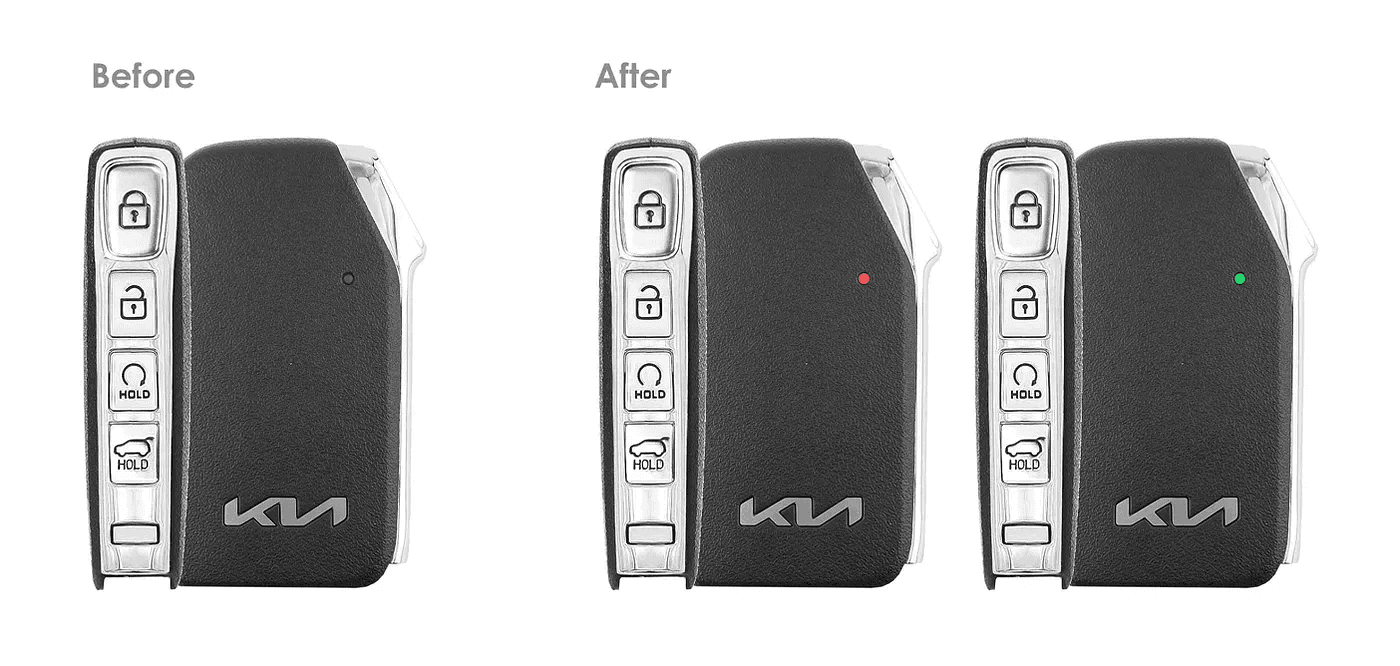
We recently bought a Kia Sonet, and I’ve genuinely been loving the drive, the design, and the smart features. But not long after using it, I ran into a small yet surprisingly common problem with the key fob and I wondered: Do you guys experience this too? Every time I walk away from the car, there’s this moment of doubt: “Wait… did I actually lock it?” I found myself pressing the lock button again sometimes multiple times just to be sure. It’s such a small thing, but it sparked a bigger thought around how key fobs are designed and how they could be improved with a simple change. The Problem: Key Fobs Don’t Talk Back Remote car keys are designed to command lock or unlock the car. But what they don’t do is confirm the current state of the car. There’s no indicator or feedback on the fob to tell you: Whether your last press actually worked Whether your car is currently locked or not Whether someone accidentally unlocked your car by playing with the remote As long as the fob is within signal range even if you’re inside your house or at a café nearby a single button press can unlock your car without your knowledge. This isn’t just inconvenient. It can become a security risk if: A child plays with the remote The unlock button is pressed unintentionally You assume the car is locked when it’s not Yes, some cars auto-lock after a few seconds if no door is opened but that feature isn’t foolproof. What if it fails? Or what if you’re simply unsure it was ever locked in the first place? Real Example: The Kia Sonet Key Fob Let’s take the Kia Sonet key fob as an example. It has a sleek, minimal design with three simple buttons: Lock, Unlock, and a trunk opener. But even with its smart functionality and premium build, there’s one thing missing: A way to know the current lock status. So, here’s a shoutout to @Kia: This is a tiny UX upgrade worth exploring! A Thoughtful Addition: A Lock Status Indicator on the Fob This led me to the idea: What if the remote had a small indicator that shows whether you last locked or unlocked the car? A simple cue to give peace of mind. You glance at your fob, see “Locked,” and go on with your day. No need to hit the button again. No need to peer back at your car. It seemed so obvious. But then my father raised a great point. The Question My Father Asked: “Won’t that drain the battery?” He was absolutely right to ask this. Most fobs are battery-powered, and a screen or light-based indicator would either: Continuously use power, or Require circuitry to sync with the car’s actual status That would introduce more complexity, power consumption, and possibly more room for error. My Solution: A Mechanical State Indicator So I flipped the problem on its head. Why not go battery-free? The Concept: A simple mechanical indicator embedded into the fob that: Changes visually when you press the Lock or Unlock button Uses colored films (e.g., red for lock, green for unlock) Relies purely on the mechanical force of pressing the button no power needed Press enter or click to view image in full size Just a design interpretation. 🔴 Lock → Shows Red 🟢 Unlock → Shows Green Think of it like a tiny color window that shifts based on which button you last pressed. How It Works: Inside the fob, a small disc or slider is connected to the button mechanism. Pressing Lock pushes the red film into view. Pressing Unlock slides the green film into place. It’s fully mechanical, so it doesn’t consume battery or require electronics. The indicator doesn’t claim to know the car’s actual state just what you last did. And that’s often all a user needs: A small sign that says, “You already locked it.” Enough to put the mind at ease. It’s a small UX improvement with potentially big impact. In the age of smart everything, sometimes the smartest fix is a simple one. What are your thoughts on this?
Let's Work together
